> For the complete documentation index, see [llms.txt](https://guide.woay.vn/llms.txt). Markdown versions of documentation pages are available by appending `.md` to page URLs; this page is available as [Markdown](https://guide.woay.vn/cau-hoi-thuong-gap/landing-page-woay-page.md).
# Landing Page/Woay Page
Tại sao tôi đã update ảnh, thông tin tại mục SEO nhưng các ảnh và thông tin vẫn không được cập nhật?
Facebook cần một khoảng thời gian nhất định để nhận các thông tin và ảnh này. Để Facebook nhận ảnh và các thông tin nhanh chóng bạn cần thực hiện các bước sau: \
\- *Bước 1:* Truy cập vào trang \
\- *Bước 2:* Điền link trang của vào thanh. \
\- *Bước 3:* Click "Debug", bạn sẽ thấy trang sẽ hiển thị ra các thông tin của trang. Nếu vẫn là các thông tin và ảnh cũ bạn cứ 30s ấn "Debug" lại 1 lần để Facebook cập nhật cho đến khi Facebook nhận được.
Tắt người danh sách người chơi trúng thưởng hiện ra trên game ở đâu? Data trúng thưởng này có thể tự cài đặt được hay không?
Data trúng thưởng này là nền tảng cập nhật sẵn, không thể điều chỉnh được thông tin người trúng theo yêu cầu. \
Để không hiện lên thông tin báo trúng thưởng này ở trên game nữa, bạn thao tác như hình:\

Đã điền link chat vào inbox/mua hàng nhưng không trỏ về link đã điền?
Nút "Inbox": trỏ về message (kênh chat của fanpage, zalo....) cần điền đúng thông tin link:
* Message: cần gắn link: để trỏ về đúng kênh chat. Ví dụ như hình dưới:
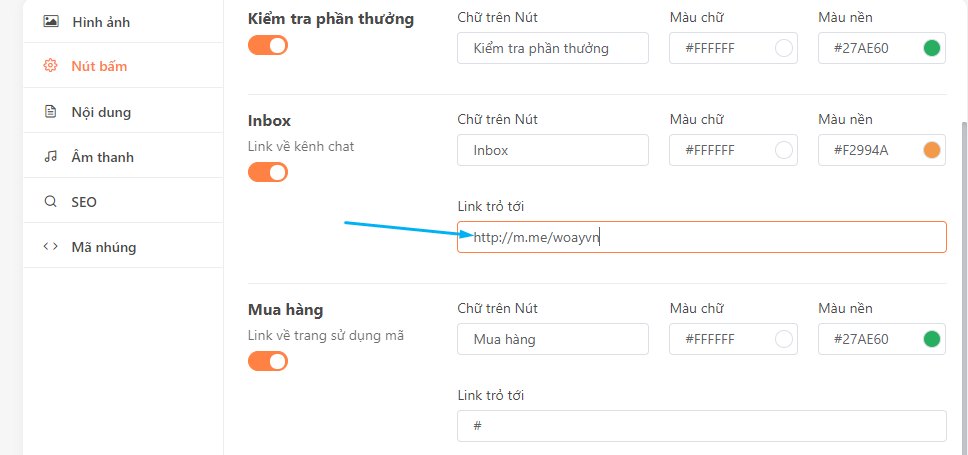 * Zalo: cần gắn link: để trỏ về đúng kênh chat.Ví dụ như hình dưới:
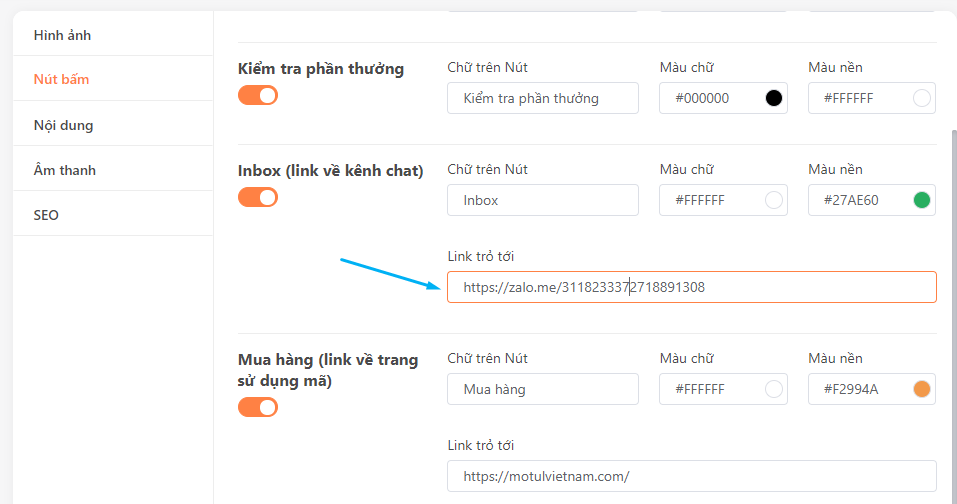 Ngoài ra, bạn có thể trỏ link về website/fanpage để user click nút "Mua hàng" và sử dụng phần thưởng đã trúng (mã giảm giá, voucher,...) được thuận tiện hơn.